> ## Documentation Index
> Fetch the complete documentation index at: https://docs-beta-fuze.chaoslab.co.nz/llms.txt
> Use this file to discover all available pages before exploring further.
# Browser Use
> AI agent that browses the web to extract data and take screenshots
# Browser Use
Browser Use is an AI agent that browses the web to extract data and take screenshots for you.
If login is required:
* You'll get an email with a link
* You log in manually
* The agent continues
Your login credentials are never stored.
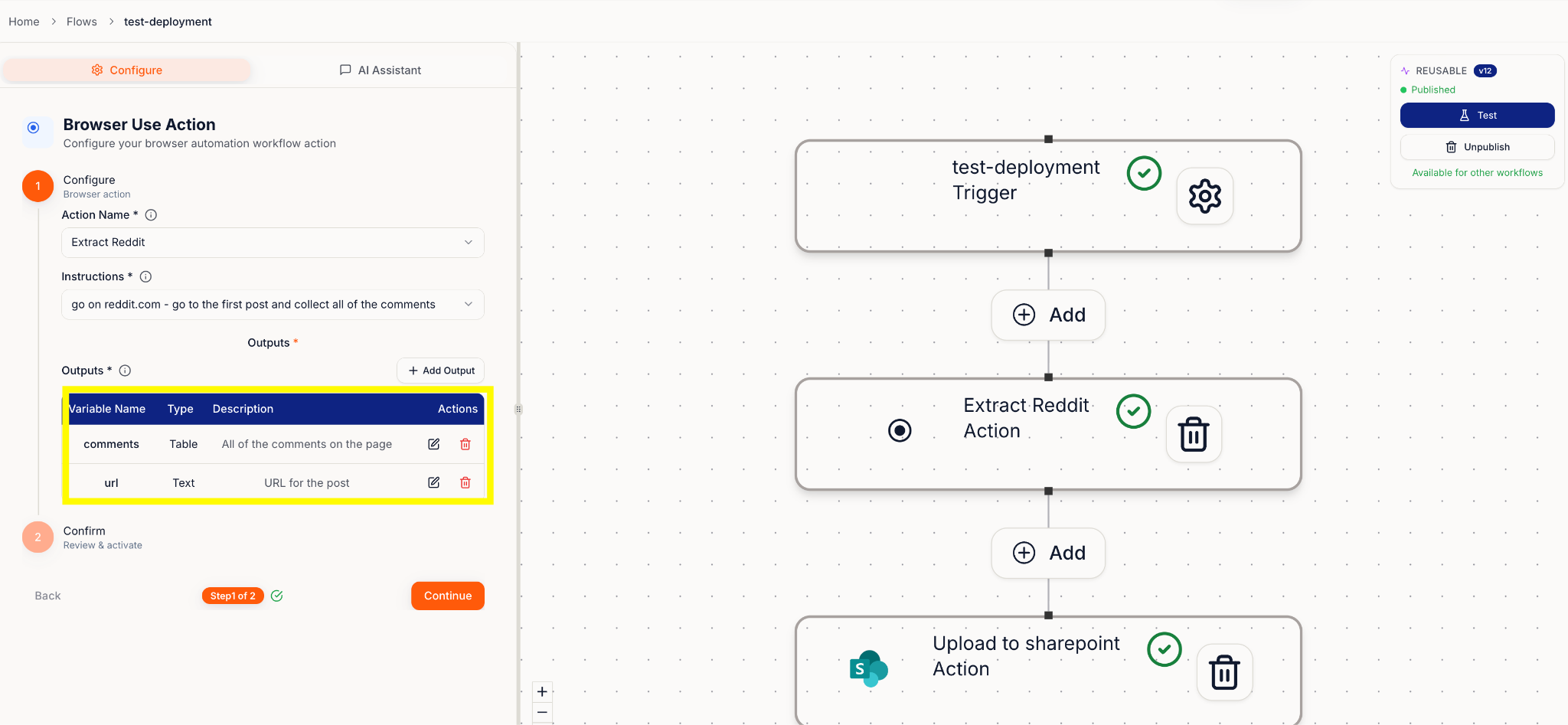 ***
## Write instructions like you're texting a helpful teammate
Be clear and specific. Tell the agent where to go, what to find, and what to bring back.
**Examples:**
* "Go to \[link], open \[tab], find the graph for weekly power usage, and take a screenshot."
* "Go to \[SharePoint link], open \[document name], and extract client name and address."
***
## Outputs
List exactly what you want returned, for example:
* Weekly power usage graph (screenshot)
* Client name
* Client address
***
## Write instructions like you're texting a helpful teammate
Be clear and specific. Tell the agent where to go, what to find, and what to bring back.
**Examples:**
* "Go to \[link], open \[tab], find the graph for weekly power usage, and take a screenshot."
* "Go to \[SharePoint link], open \[document name], and extract client name and address."
***
## Outputs
List exactly what you want returned, for example:
* Weekly power usage graph (screenshot)
* Client name
* Client address